
AI replies, your model
Choose Fix Credits or your own API account. Replies read the post before writing.
Fix X Agent is a Chrome extension that writes helpful AI replies, likes and comments while it scrolls, and works through a whole list of post links for you, with human-like timing.
Next extension build: v1.9.2 · Compact controls, faster duplicate checks · See what changed →
Extension changes require v1.9.2 after approval and installation.

Their first eligible bot purchase unlocks your reward. Create your link now; add a wallet only when you claim.
Get your referral link →01 Share your link
02 Your friend makes a first purchase
03 Claim · review · receive USDT
Four simple steps. The picture guide below explains every button.
Add the extension from the Chrome Web Store and pin it.
How to install →Buy an Access Key here with USDT on Binance. It arrives instantly.
See plans →Open the extension, enter your key and the same X username.
How to log in →Choose Fix Credits or add your own API key, pick a mode on x.com and press Start.
How to start →Free to install. You only need an Access Key to unlock the agent.
After installing, open x.com once and refresh the page so the agent can load.
Real screenshots of the extension. Use the Memory tab for the new gear settings, saved links and billing controls.
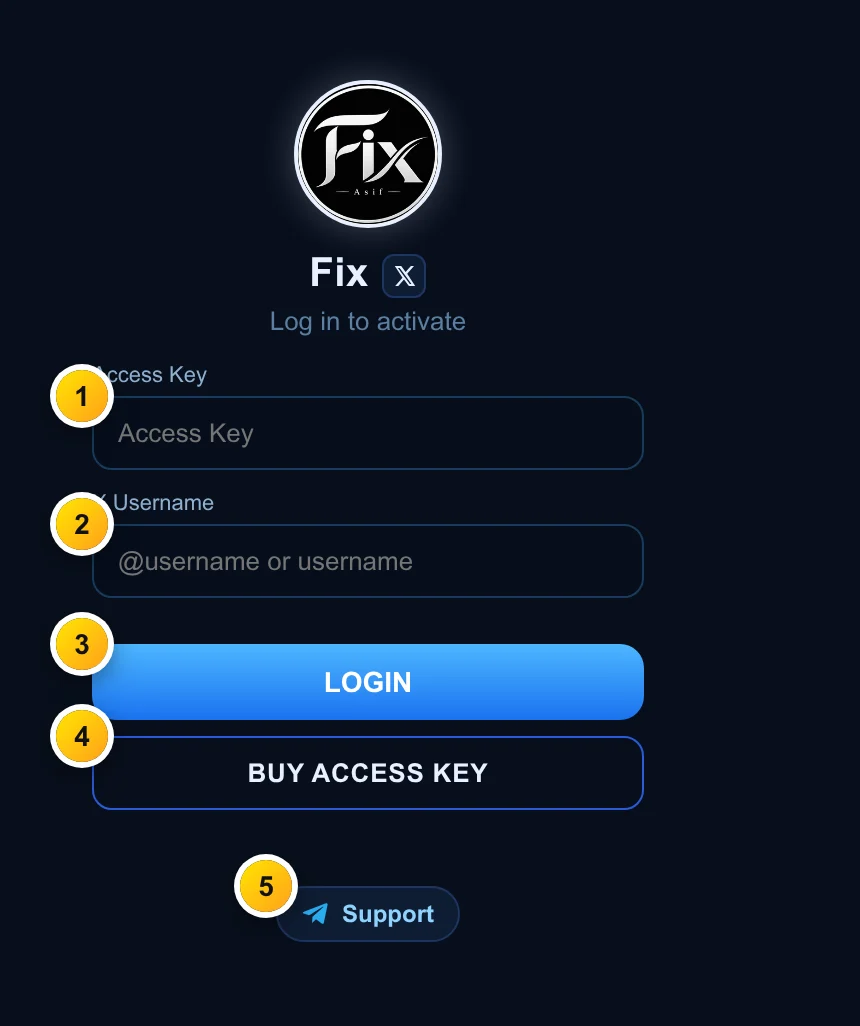
Click the Fix icon in your browser toolbar. This window appears first.
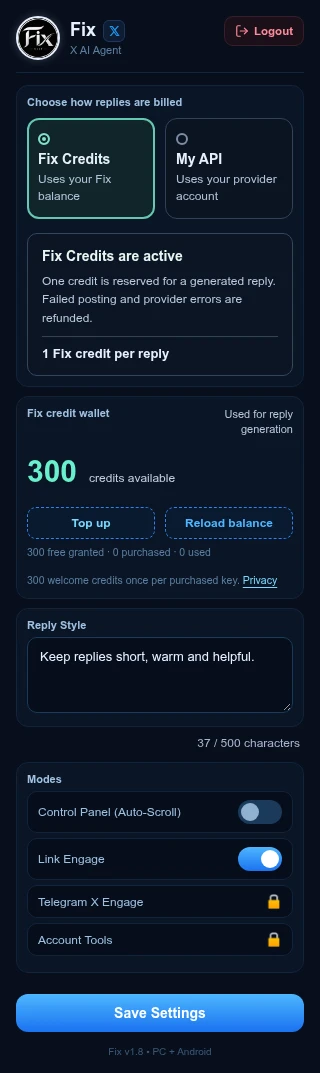
The highlighted source and billing banner show exactly which account pays for replies.
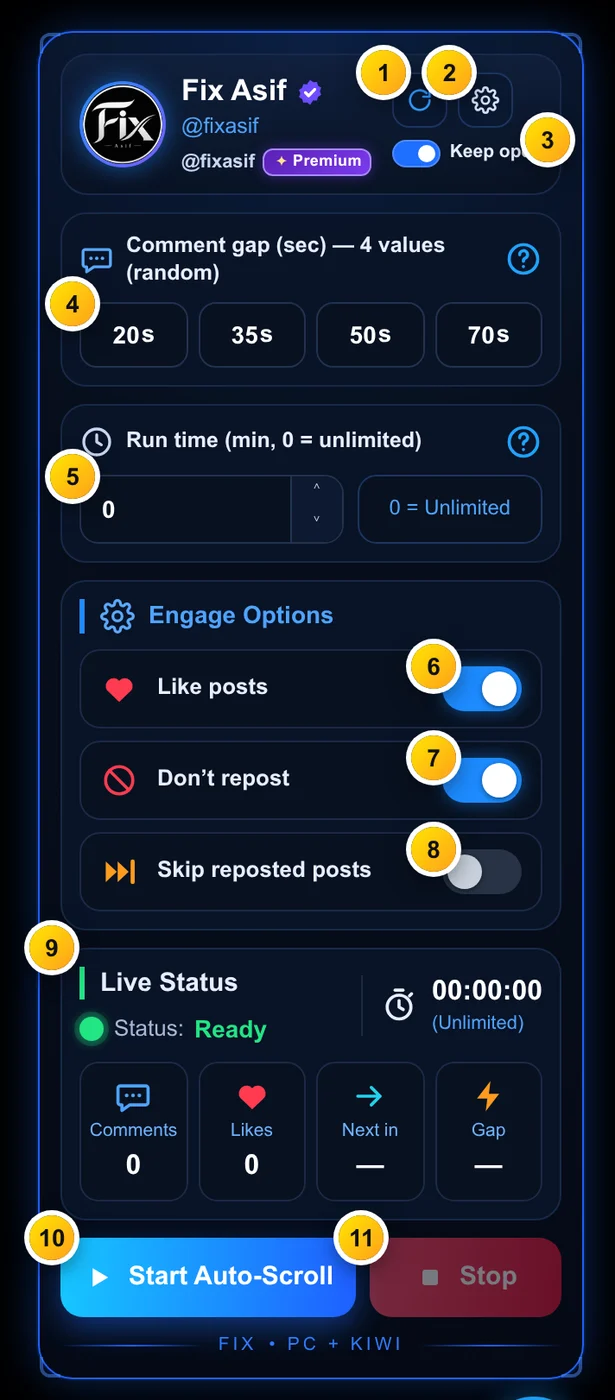
Open x.com. The panel appears on the page (or tap the round Fix button at the bottom-right). Drag it anywhere and resize it from the corner.
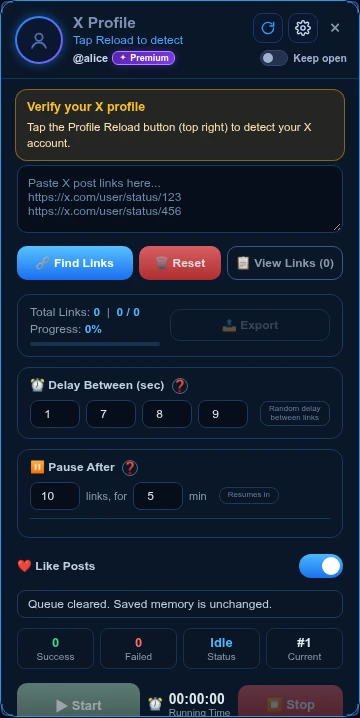
Turn on Link Engage in the extension popup and open x.com. Check Profile Reload before running a queue.
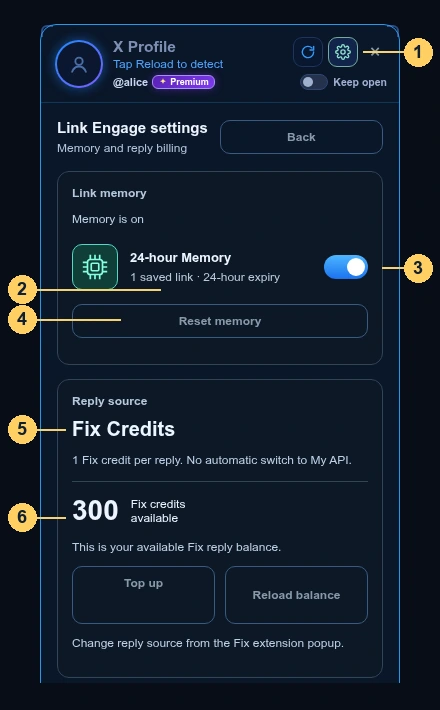
Memory is local history, not your current queue. Completed and failed attempts are recorded separately for each X username.
Find Links removes expired records after 24 hours. Duplicate detection uses the post/status ID, even when the URL’s username or query differs. To retry a failed attempt sooner, stop the queue and reset Memory deliberately. If submission was unconfirmed, inspect the post manually: its separate 24-hour automatic-retry guard remains, even after Memory Reset.
How it works at the bottom of gear settings opens the English offline guide.
Open English PDF guide →Keep comment gaps at 60 seconds or more. Faster is riskier.
Run 20-40 minutes, then take a break. Use Run time to stop automatically.
Use Pause After (e.g. 10 links → 5 min) for long lists.
Friendly and helpful replies get the best results.
Never post keys publicly or share your AI API key. For gifts, use your purchased X username instead of sharing the key. The key stays bound to your X username.
Refresh x.com, press Profile Reload, then Start again. Still stuck? Telegram.
Built for real accounts, careful, human-like and fully under your control.
Choose Fix Credits or your own API account. Replies read the post before writing.
Scrolls your feed, likes and comments with random gaps, and skips reposts.
Paste any messy list of links, it cleans it, opens each post once, likes and comments.
Random delays, pause-after-N and run-time limits keep it natural.
Works on PC and Android phones, with movable, resizable panels.
Your key only works with the X username you chose, nobody else can use it.
Sign up with Google or email, your keys and receipts stay in your dashboard.
Choose a plan, enter your X username and send the exact USDT on Binance.
Paste the Binance Order ID and get your key + receipt instantly.
Enter the key + same X username in the extension and start.
All plans include every feature and Telegram support.
Prices in USDT. Your key’s validity starts at purchase.
FIX CREDITS
Every purchased Access Key gets 300 welcome credits once. Keep using your own API, or choose Fix Credits. Topups start at 500 credits with lower rates at 1,000 and 5,000.
See credit prices → See what is new →Installing is free from the Chrome Web Store. To use the agent you need a premium Access Key. Choose Fix Credits or use your own AI API key.
Open the Binance app → Pay → Send → choose Binance ID → enter our ID shown at checkout → send the exact USDT amount. Then open the payment in your history and copy its Order ID.
In Binance: Pay → History → tap the payment → copy the Order ID number. Paste it in step 2 of checkout.
Your Access Key is locked to that X username. In the extension you must log in with the key and the same username. Double-check it before paying.
Make sure you are logged in to the extension and one mode (Auto-Scroll or Link Engage) is on in Settings and saved. Then refresh x.com. On Android use a browser that supports Chrome extensions.
Log in here with the same Google/email account → My keys. You can copy the key, see its expiry and download the receipt any time.
No. Choose Fix Credits to use your key’s reply balance, or My API to use your own provider account. Each purchased key includes 300 welcome credits once.
Wait 1-2 minutes and try again. Make sure you sent the exact USDT amount within 30 minutes. Still stuck? Message us on Telegram with your Order ID.
The agent uses random gaps, pauses and human-like actions. Still, use sensible settings (see Safety tips), automation always carries some risk.
1) Install the extension. 2) Open it → enter the Access Key and the same X username shown on the key → LOGIN. Another username will not work.
| Date | Plan | X account | Amount | Binance Order ID | Status |
|---|
No purchases yet.
Problem with a payment or key? Message us on Telegram with your Order ID.
@Fixasif on TelegramLog out of this device.
Log in to buy keys and see your dashboard.
Plan: -
Binance Pay · USDT · Exact amount only

This QR identifies the recipient. Enter the exact order amount yourself. Use Binance Pay, not an on-chain withdrawal.
Only a verified payment issues your Access Key. Pressing “I have paid” does not confirm payment.
Binance → Pay → History → open the successful USDT payment → copy Order ID. Do not paste the website order number or an on-chain TxID.
Your receipt is below. It is also saved in your account.